The Problem
The NYT Spelling Bee is an addictive word puzzle that I enjoy playing. When I get stumped for long enough before reaching 'Genius' level, I reach for the Spelling Bee Buddy—a companion tool that interactively gives hints about starting letters, word lengths, and a comparison of your words with other Buddy users. These clues are normally enough to help me reach 'Genius' and rarely even 'Queen Bee'. Flipping between the tabs for the game and Buddy got me thinking that it would be nice to have both on the same page.
I'd used Tampermonkey userscripts before, but wanted to try building a browser extension to embed the Buddy into the game page.
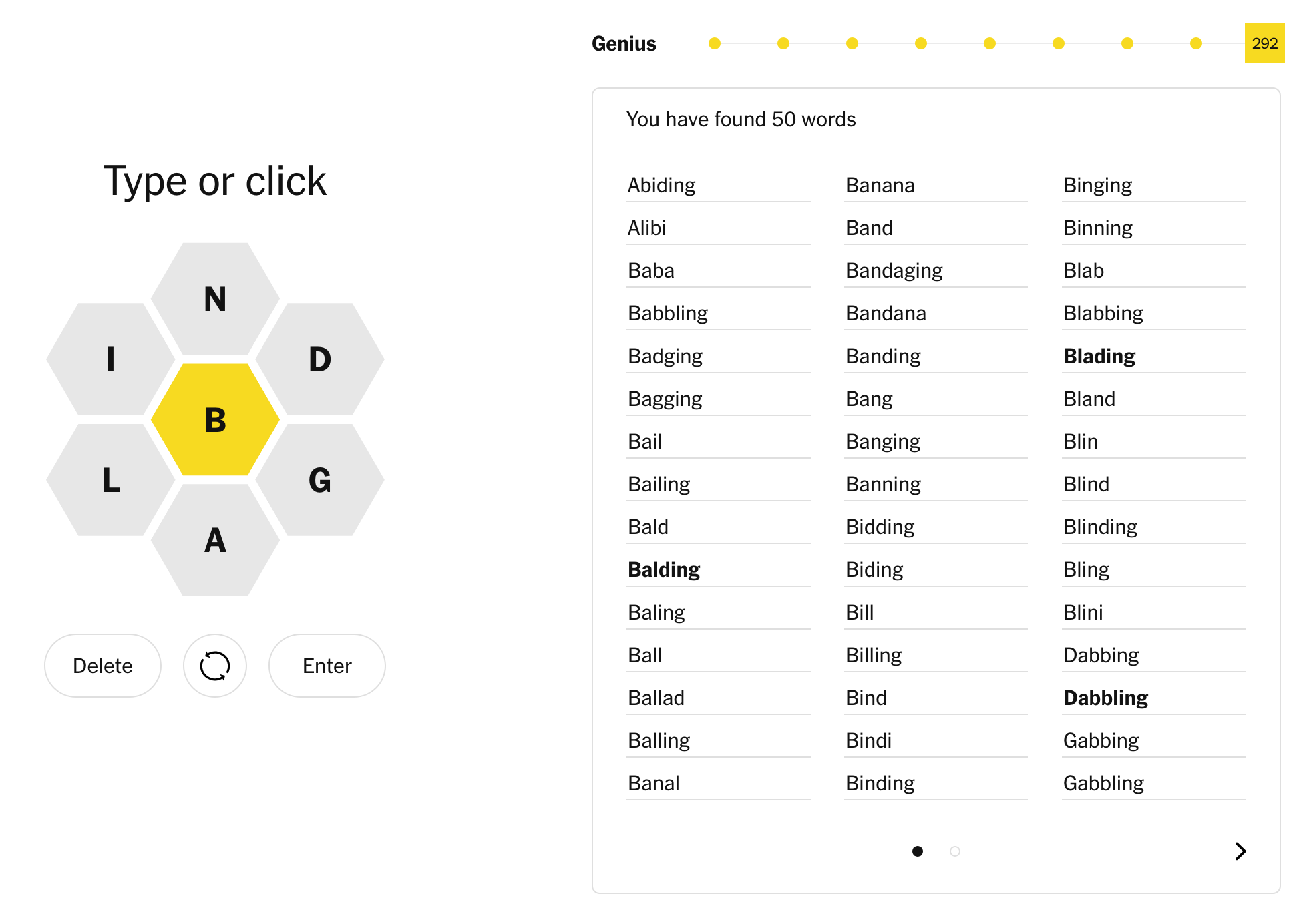 The NYT Spelling Bee puzzle interface
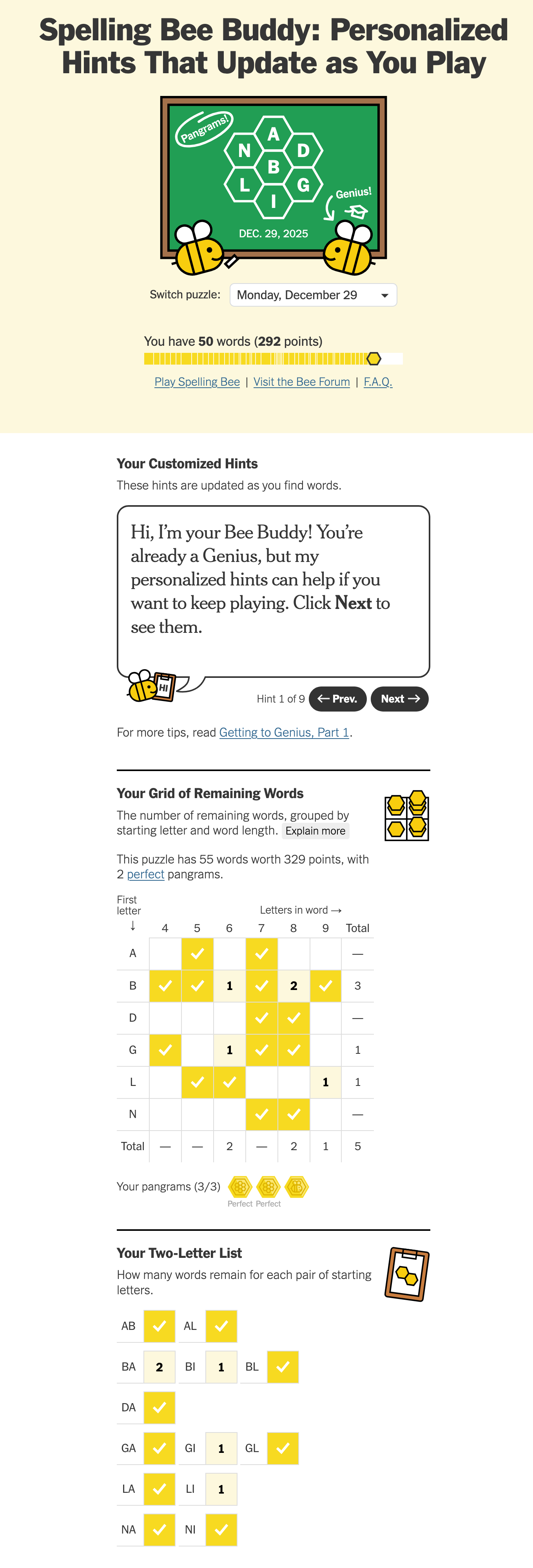
The Spelling Bee Buddy on its own page
Building the Extension
Initial Approach: Simple iframe Injection
The first iteration was straightforward - inject an iframe into the game page that loads the Buddy content:
const iframe = document.createElement('iframe');
iframe.src = 'https://www.nytimes.com/interactive/2023/upshot/spelling-bee-buddy.html';
gameContainer.insertAdjacentElement('afterend', iframe);
This worked, but with a major problem: the iframe loaded the entire Buddy page, including headers, footers, date selectors, and other sections (ads!) we didn't need. I only wanted the minimal content from the Buddy that helped me find the remaining words.
Challenge 1: Filtering iframe Content
The obvious solution was to inject CSS into the iframe to hide unwanted sections. However, this created several issues:
- Cross-origin access: Direct iframe manipulation via
contentDocumenthad limitations - Timing issues: Content loaded asynchronously, requiring MutationObservers
- Complexity: The main content script became bloated with iframe manipulation logic
The Solution: Separate Content Scripts
Instead of manipulating the iframe from outside, I created a dedicated content script (iframe-content.js) that runs inside the Buddy iframe:
// manifest.json
"content_scripts": [
  {
    "matches": ["https://www.nytimes.com/puzzles/spelling-bee*"],
    "js": ["constants.js", "content.js"]
  },
  {
    "matches": ["https://www.nytimes.com/interactive/*/upshot/spelling-bee-buddy.html*"],
    "js": ["constants.js", "iframe-content.js"],
    "all_frames": true  // Runs in iframes too
  }
]
The manifest's "all_frames": true setting means the script runs both when the Buddy page loads in an iframe and when users visit it directly. This was a surprise—I'd assumed it only applied to iframes. The solution was a simple check at the top of the script:
// Only run when in an iframe (not standalone page)
if (window.self === window.top) {
  return;
}

const style = document.createElement('style');
style.textContent = `
  .sb-buddy-container > * {
    display: none !important;
  }
  .the-square,
  .the-square-part-two {
    display: block !important;
  }
  /* Hide headers, footers, etc. */
`;
document.head.appendChild(style);
This approach is cleaner because:
- The iframe script has full access to its own DOM
- No cross-origin issues
- Timing is simpler—the script runs when the iframe loads
- Separation of concerns—each script manages its own domain
Challenge 2: Dynamic iframe Sizing
After hiding the unwanted sections, the iframe was left with excessive whitespace below the visible content. The iframe itself can't resize based on its own content—only the parent page can adjust the iframe's dimensions. This creates a coordination problem: the iframe needs to tell the parent what height it should be.
The postMessage Pattern
The iframe content script measures its own content and communicates back to the parent:
// Inside iframe-content.js
function sendHeight() {
  const container = document.querySelector('.sb-buddy-container');
  if (container) {
    const height = container.scrollHeight + 40;
    window.parent.postMessage({
      type: 'spelling-bee-buddy-resize',
      height
    }, 'https://www.nytimes.com');
  }
}
The main content script listens and updates the iframe:
// Inside content.js
window.addEventListener('message', (event) => {
  if (event.origin !== 'https://www.nytimes.com') return;
  if (event.data && event.data.type === 'spelling-bee-buddy-resize') {
    iframe.style.height = event.data.height + 'px';
  }
});
A ResizeObserver ensures the height updates whenever the content changes:
const resizeObserver = new ResizeObserver(sendHeight);
resizeObserver.observe(container);
Challenge 3: Date Synchronisation
The Spelling Bee allows playing historical puzzles via URLs like /puzzles/spelling-bee/2025-12-27. The Buddy needs to display the same date's grid.
My first attempt involved 200+ lines of code to programmatically click through the Buddy page's date dropdown selector. It was fragile and overly complex.
After analyzing the beautified JavaScript source, I found the Buddy page already supported a ?date=YYYY-MM-DD URL parameter. I deleted all 200+ lines and replaced it with:
iframe.src = `${BUDDY_URL}?date=${gameDate}`;
The extension simply parses the date from the game page URL and appends it to the Buddy iframe URL:
function parseGameUrl(url) {
  const match = url.match(/\/spelling-bee(?:\/(\d{4}-\d{2}-\d{2})|\/?$)/);
  return {
    isValid: match !== null,
    gameDate: match?.[1] || null
  };
}
For historical puzzles with dates in the URL (like /spelling-bee/2025-12-27), the regex extracts the date. For today's puzzle (just /spelling-bee), gameDate is null, and the Buddy page defaults to today.
// Final implementation - simple and reliable
const { gameDate } = parseGameUrl(window.location.href);
iframe.src = BUDDY_URL + (gameDate ? `?date=${gameDate}` : '');
With the core functionality complete—iframe embedding, content filtering, dynamic sizing, and date synchronization—the extension now seamlessly integrates the Buddy into the game page:
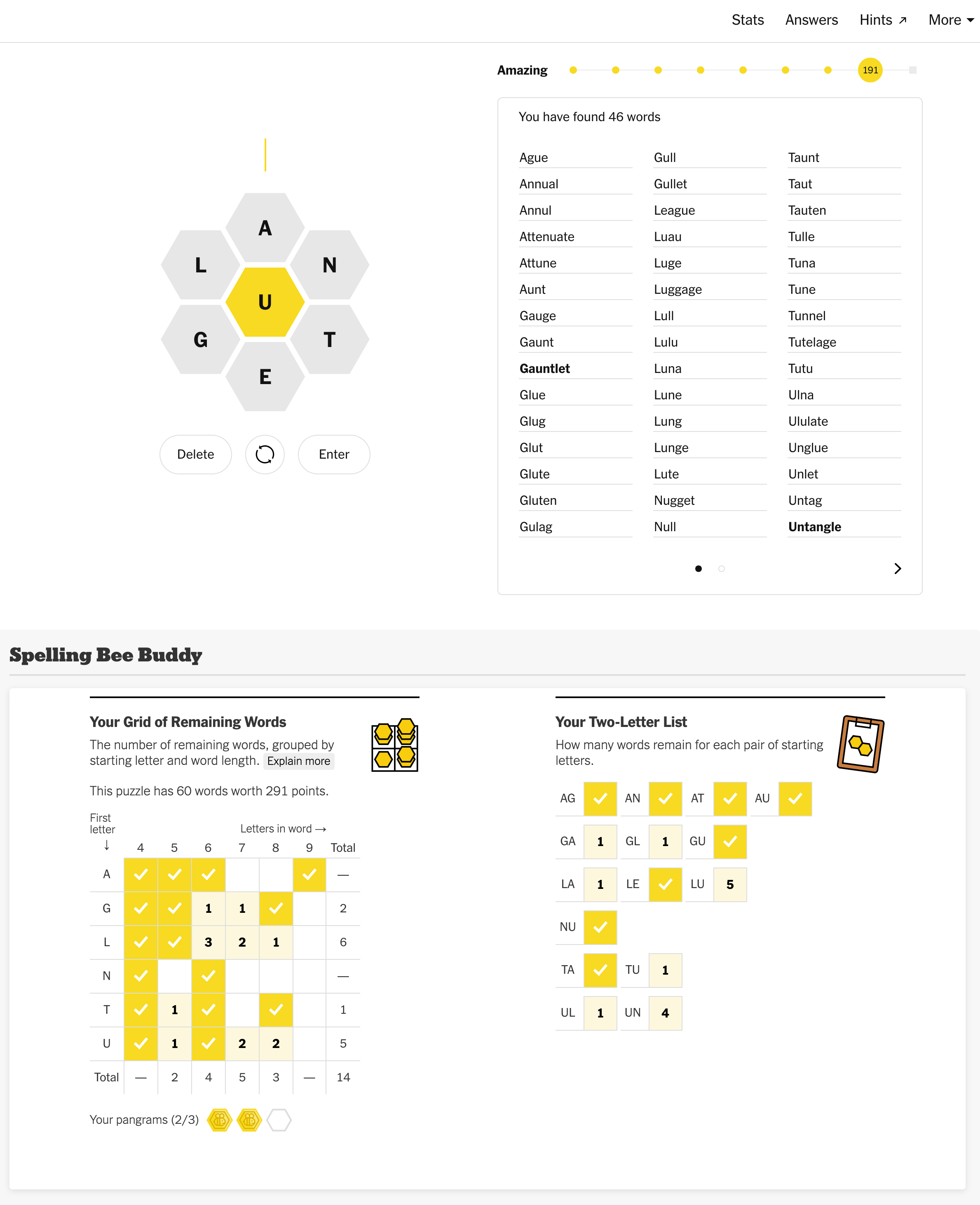 The extension embeds the Buddy's grid and two-letter list directly below the game for easy reference
Challenge 4: Cross-Browser Compatibility
With the core functionality working reliably in Firefox (my primary browser), I was curious how much effort would be needed to make this work in Chromium-based browsers too.
Both Firefox and Chrome have adopted the WebExtensions standard, which in theory means extensions should work across browsers with minimal changes. Firefox even provides a porting guide for adapting Chrome extensions. However, modern browser extensions face a unique challenge: Firefox and Chrome have diverged in their implementation of Manifest V3, particularly around permissions.
Manifest V3 support in Firefox has some quirks and non-obvious differences in behaviour between V2 and even V3 in Chromium. The most problematic: Firefox treats MV3 host_permissions as optional, allowing users to deny them. This breaks the extension since it requires access to inject content scripts.
// Manifest V3 - permissions shown as "optional" in Firefox
"host_permissions": [
  "https://www.nytimes.com/*"
]
Firefox bug #1839129 tracks this behaviour.
The Solution: Dual Manifests
I created separate manifest files for each browser:
manifest.json (Chrome - Manifest V3):
{
  "manifest_version": 3,
  "content_scripts": [...]
}
manifest-firefox.json (Firefox - Manifest V2):
{
  "manifest_version": 2,
  "permissions": [
    "https://www.nytimes.com/puzzles/spelling-bee*",
    "https://www.nytimes.com/interactive/*/upshot/spelling-bee-buddy.html*"
  ],
  "content_scripts": [...]
}
In Manifest V2, permissions listed in the permissions array are required and properly displayed during installation.
The extension evolved through an interesting architectural decision:
- Started: Firefox-only with Manifest V2
- Attempted: Migration to Manifest V3 for Chrome compatibility
- Discovered: Firefox treats MV3
host_permissionsas optional (users can deny), breaking the extension - Final solution: Maintain two manifests
Build Script
The build script swaps manifests during packaging:
# Firefox build - use Manifest V2
mv manifest.json manifest-chrome.json.tmp
mv manifest-firefox.json manifest.json
zip -r extension-firefox.xpi manifest.json content.js ...

# Restore for Chrome build
mv manifest.json manifest-firefox.json
mv manifest-chrome.json.tmp manifest.json
zip -r extension-chrome.zip manifest.json content.js ...
This dual-manifest approach lets us optimize for each browser's permission model while maintaining a single codebase. The only difference between the packages is the manifest version and structure.
Cleaning Up the Code
After getting the basic functionality working, I cleaned up unnecessary defensive programming patterns:
- Removed 6 redundant container selectors that never matched—only
#js-hook-game-wrapperwas needed - Fixed the MutationObserver that was calling
embedBuddy()6+ times by adding proper disconnect logic - Removed IE compatibility fallbacks like
iframe.contentDocument || iframe.contentWindow.document - Deleted redundant
DOMContentLoadedchecks (the manifest already specifies"run_at": "document_idle")
The optimization reduced the codebase from ~250 lines to ~150 lines by removing code that never executed.
User Experience Polish
1. Side-by-Side Layout
The Buddy page originally displays the grid and two-letter list vertically stacked, requiring significant scrolling. The extension arranges them side-by-side when there's sufficient width:
const style = document.createElement('style');
style.textContent = `
  .the-square,
  .the-square-part-two {
    display: inline-block !important;
    vertical-align: top;
    width: calc(50% - ${SECTION_GAP}px);
  }
  @media (max-width: ${MIN_SECTION_WIDTH * 2}px) {
    .the-square,
    .the-square-part-two {
      display: block !important;
      width: 100%;
    }
  }
`;
This reduces scrolling distance and lets players see both widgets at a glance.
2. Graceful Loading
The iframe starts hidden and reveals when content loads:
iframe.style.visibility = 'hidden';

iframe.onload = () => {
  iframe.style.visibility = 'visible';
};

// Fallback timeout ensures iframe appears even if onload doesn't fire
setTimeout(() => {
  iframe.style.visibility = 'visible';
}, FALLBACK_VISIBILITY_TIMEOUT);
3. Error Handling
If the iframe fails to load, show a helpful message:
iframe.onerror = () => {
  console.error('[Spelling Bee Buddy] Failed to load content.');
  const errorMessage = document.createElement('p');
  errorMessage.textContent = 'Failed to load Spelling Bee Buddy. Please check your connection and refresh.';
  errorMessage.style.color = '#d00';
  container.appendChild(errorMessage);
};
Key Takeaways
Three patterns emerged while building this:
-
Check for the simple solution first - Before writing 200 lines to manipulate a dropdown, I should have examined the page's existing URL parameters and JavaScript API. Simple solutions often already exist.
-
Defensive programming can make code worse - Multiple fallback selectors, excessive try-catch blocks, and "just in case" observers add complexity without value when only one code path ever executes. This defensive code doesn't just waste cycles—it makes the code more fragile in unintuitive ways by introducing modalities in behaviour. It also increases complexity, making the code harder to understand and maintain. Test in the actual environment, measure what actually happens, then remove the code that never executes.
-
Separate content scripts beat external manipulation - Running a dedicated script inside the iframe (
all_frames: true) was cleaner than trying to manipulate it from outside. Let each context manage itself.
Designing the Icon
Browser extensions require icons at multiple resolutions. I opted to create a vector-based SVG that could be resized to the different required resolutions, using an AI agent to design a bee icon instead of hunting for stock graphics.
 →
→

Icon evolution: from backwards wings to proper flight position
I used an agent to design a bee icon in SVG format instead of using stock graphics. The initial design had three problems:
- Wings pointed backwards - They looked like the bee was flying in reverse
- Wings on the underside - Positioned below the body instead of on top
- Stripes all the same width - They bled outside the oval abdomen shape
I asked it to flip the wings horizontally, but instead it changed the rotation angles from -35° to +35°. This didn't exactly flip them, but spread them out more—which actually looked better, so I kept it.
For the stripes, I asked the agent to calculate the proper width for each one so they'd align with the sides of the oval abdomen. It used the ellipse equation to determine the correct width at each y-position, producing stripes that narrowed naturally where the body tapers.
Generating Multiple Sizes
ImageMagick makes it easy to generate the required icon sizes (48px, 96px, 128px) from the SVG source:
magick -background none icon.svg -resize 128x128 icon-128.png
One gotcha: The -background none flag must come before the input SVG, not after, or you get a white background instead of transparency. (Thanks to xeruf on Stack Overflow.)
Wrapping Up
Building this extension turned out to be more fun than I expected. What started as a simple iframe injection evolved through several challenges to get the right result: filtering iframe content with separate content scripts, syncing dates across pages, handling cross-browser compatibility quirks, and optimizing away defensive code patterns.
The final result is a ~150 line extension that embeds the Buddy's helpful grid and two-letter list directly into the game page, eliminating the need to flip between tabs.
If you're a Spelling Bee player who uses the Buddy, give the extension a try. And if you're interested in browser extension development, the source code is available on GitHub—feel free to explore how it works or suggest improvements.
Installation
The extension is available for both Firefox and Chrome:
- Install on Firefox Add-ons
- Chrome Web Store (Coming soon - pending review)
- Source code on GitHub - For manual installation or to contribute
Resources
Comments
Comments